Showing posts with label Blogging Tutorials. Show all posts

Saturday, September 1, 2012

Raising the white flag in my Google Reader


I haven't visited my Google Reader in weeks because it's just too scary. There are always 1000+ unread items and it looks like something exploded upon my screen. No matter how hard I try I can't organize all of the blogs I read easily and all of the scrolling makes me want to wring Google's neck.

So? I give up.

I'm starting over again with a new reader I recently discovered (thanks to my friend Tottums) called Bloglovin. I think it might actually help me keep up with the blogs I love to read!

Why Blog Readers will love it:

-It is super easy to group the blogs you read into categories. Just make a few groups (Favorites, Daily, Weekly, etc...whatever buckets you like to dump the blogs you read into) and then when you Follow a blog, the "add to group" button and menu automatically appears and you can file away to your heart's content. This always took me forever on Google Reader.

-The scrolling is SO much better. Yes, you still have to scroll if you follow a lot of blogs - BUT each entry contains a photo and just the first few lines of text. Note: I guess this might be a downside for those of you who like to read the entirety of every single post within your reader - but I find it saves me a ton of time being able to focus on content instead of my cursor-with-a-mind-of-its-own jumping all over the place.
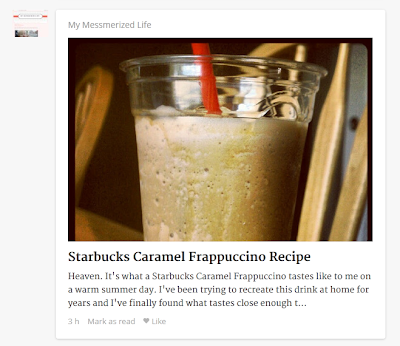
Bloglovin, blog post
What a blog post looks like in Bloglovin
-When you click on a post to read it, a toolbar appears at the top of the blog/page which lets you easily jump to the other new posts with a handy "Next" button. The toolbar also has Twitter, Facebook, and Pinterest buttons for easy sharing.

Bloglovin, toolbar
Toolbar
-You can opt to have an e-mail sent to you daily with new posts, or even an e-mail for each new post as it publishes

-You can explore other great blogs to read! There is a Top Blogs section with which you can sort by category and/or location.

Top Blogs
Top Family blogs in the United States

Why Bloggers will love it:

-For each of your posts, there is a "Like" button underneath. If even just a couple people click "Like", your post might appear on the Popular Posts page or on the Bloglovin mobile app! Over the last week or so I've received a nice little bit of traffic coming from both (yay!)

-Other people can randomly discover your blog through the categories and search functions! It's basically a giant blog directory in addition to being a reader.

-You can easily update your blog information (including a thumbnail and description) once you "claim" your blog. If you have not yet claimed your blog, Bloglovin has a quick & easy tutorial you can use.

What my blog info looks like

If you'd like to, follow me there! Also, if you're already on there, or once you get your blog claimed, please link your blog in the comments below so I (and others!) can follow you, too. And no, this isn't a sponsored post. I just really like this website and think you will, too.

Follow on Bloglovin

What reader do you currently use and how do you stay on top of all of your blog reading?

Saturday, May 19, 2012

You asked! Tips on growing your blog


I often get e-mails from readers or have friends ask for tips or suggestions. By no means am I a blogging expert, but there are a number of things I have stumbled upon or tried over the last year that are easy and have been good for my blog. A few weeks ago I posted part 1 - technical tips, and this is part 2: general tips on growing your blog. This is what I get asked about most often :)

Comment on other blogs. Are there a number of blogs that you read on a regular basis? Comment on them often! It's a great way to connect with the authors of those blogs, and often they (or the many other people reading their blogs) will click on your comment and jump to your blog! This is why I really like the Intense Debate commenting platform, despite its having a number of {ongoing} technical difficulties. When I receive your comments, I often click to go to your most recent post. It's important, though, to leave meaningful comments. Please avoid "following you, follow me back!" These sorts of comments make many bloggers - myself included - feel cheap and dirty. I polled some of my blogging friends and the general consensus was that a comment like that will probably make someone less likely to visit your blog.

Blog for you. Don't start your blog with the intention of becoming blog-famous or making money. It {most often} is transparent, and won't get you very far. Blog because you want to document your life (and/or your child's), to keep family and friends updated, or just cause you enjoy it! I started writing to vent my frustrations while trying to conceive Carina, and then it became my pregnancy journal and virtual baby book. I love that 20+ years from now Carina will be able to look back {hopefully not with horror} and see what her daily life was like as a child. Remember: whether you have a handful of readers or thousands, your blog is important to someone. Staying true to yourself and what you want to write about is something of which to be proud.

Join Twitter. I know, I know, this one can be scary. I {very} begrudgingly joined Twitter last Spring and honestly thought it was stupid for a few weeks afterwards. Now? I have made so many amazing friends and connections. I truly think it is a must for anyone who is interested in growing their blog. It gives you the opportunity to interact with readers, other bloggers, and even companies in a way that blog commenting and other means of communication really can't. Plus? Twitter has saved me a ton of money. Make sure to put your blog link in your bio, as well!

Twitter can be THIS much fun. I promise.

Avoid blog envy. I know that many of us have been there. You might see someone who has better numbers, sponsors, and/or writing and it makes you feel bad about yourself, if only for a moment. It can be hard, but try not to get caught up in what other people are blogging about or trying to make your blog like someone else's. Focus on making your blog your own, and accentuating what makes it unique! <~~~this is huge, in my experience.

Swap ads/buttons. Find a couple other bloggers who are also interested in growing their blogs and swap your button with them! You put theirs on your sidebar, and they do the same with yours. This is a great {free} way to reach a larger audience. Everyone wins! Before I started accepting paid sponsors, all of the buttons I displayed were from swaps with friends of mine. I still reserve a couple of my ad spots for swaps each month because I enjoy doing it so much.

Have any other questions for me, or tips you'd like to share?


P.S. I think it's hilarious that Blogger's spell check thinks that "bloggers" isn't a real word. Nice.

Sunday, April 29, 2012

Quick and Easy Technical Blogging Tips

I often get e-mails from readers or have friends ask for blogging tips or suggestions. By no means am I a blogging expert, but there are a number of things I have stumbled upon or tried over the last year that are easy and have been good for my blog. This is part 1 of 2: technical tips! Part 2 will come in the next week or so, and will include more general or broad things. Most of these are specific to Blogger but I would imagine that other platforms have similar options as well.

Each of these should take you no longer than 10 minutes each!


Make your pictures bigger. I love seeing photos of your babies, you, your pets, etc. When the photo is just a small rectangle, it's hard to see you! Make your photos as large as possible without expanding beyond the margins of your post. An easy way to do this in Blogger: when you upload a photo, click on it. You'll see this menu:
Try the different sizes! I find that X-Large works best for my post width. If you store your photos elsewhere, see if there are different size options when you copy the image location HTML.

Ensure your post body font is readable. Nothing makes me more sad than when I arrive on your blog and can't read your posts. I think that fancy or wacky font is fun for your header, tag line, post titles, sidebar titles, and any other auxiliary areas of your blog. But, you should stick with a common and easy-to-read fonts for your posts. If you aren't sure, maybe ask a handful of friends to give it a look-see? If even one of them has trouble reading your posts, change your font. It's not worth it! If you need to make a switch, I think that all of Blogger's font suggestions are pretty good:

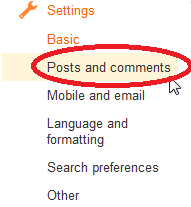
Get rid of CAPTCHA. I know I posted a "how to turn off CAPTCHA" tutorial not too long ago, but I want to mention it again, as I am still seeing a lot of bloggers using it! Every time I encounter that box of evil I want to bang my head against my desk. Please, if you have it on, or aren't sure if you do, check out my tutorial. CAPTCHA has no real benefits and discourages people from commenting on your blog. If you're worried about Spam, just turn on comment moderation (in Blogger, click on Settings > Posts and Comments > Comment Moderation).

Set a Favicon. A Favicon is the little icon that appears in the web page tab at the top of your screen. Mine is my button, which is a picture of Carina. Blogger's is that weird orange thing (is it supposed to be a B?)
This is just a unique touch that I think is nice. It also makes your blog easy to spot amongst all the others if someone has a number of tabs open in their browser. In Blogger, select Layout and click the "Edit" link in the Favicon section (top left).
 Then upload your blog button, or another picture to represent your blog. Save. Done!

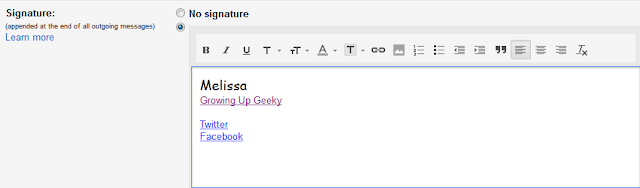
Add your blog link to your e-mail signature. If you use a separate e-mail address for your blog (like I do), adding your blog link to the signature is a great idea. Whenever I get an e-mail from another blogger, I am always happy when it includes a link to their blog. Sometimes it's hard for me to recognize someone from their e-mail address, but when I can jump to their blog quickly it's much easier for me to figure out exactly who I'm speaking with! How? If you use Gmail, it's simple! At the top right, click the gear icon, and go down to Settings. Then, scroll down to Signature and add your link! Make sure to Save Changes (I forgot last time, oops!)


Create a button. If you have a grabbable (is that a word?) button, other bloggers can post it on their blogs! Sharing or swapping blog buttons is a great way to reach a larger audience. You can pay someone to make one for you, or you can try yourself! Despite having absolutely no artistic skills, I have made a few of my own. It's really easy. Upload a picture you like to picmonkey.com and Crop or Resize your photo. For either option, enter the size you'd like (125x125 and 150x150 are common sizes) and Apply.

Then select an overlay (I used a rectangle for the button below) and then put your blog title over it, or just put the title directly over the picture somewhere. Save, and store wherever you store photos.
Overlay and/or title text
Now the more confusing part. You need a text box with the code so that someone can actually grab that button you just created. It looks like this:
On your Layout screen, copy and paste this into a Blogger HTML gadget, and edit what is bold below:
<a href="yourbloglinkhere" target="_blank"><img src="imagelocation" /></a><br />
<textarea name="blogname" rows="5" style="width: 250px;"><a href="yourbloglinkhere/" target="_blank"><img src="imagelocation" /></a></textarea><br />

The number of rows and width of the text box can be adjusted to fit your blog sidebar. You don't have to keep "5" and "250".

Align your buttons/ads. Maybe it's the anal perfectionist in me, but it drives me crazy when things on my blog don't line up. It's pretty easy to make sure all of the blog buttons or ads you display are the same size and aligned correctly. I think it looks more clean and professional that way. Just follow my easy tutorial!


Please weigh in! What tips or suggestions would you add? OR - are there blogging-related things you'd like to know more about, or how to do?

Saturday, March 10, 2012

Blogging Tips - How to turn off CAPTCHA on Blogger

CAPTCHA is my worst blogging enemy.

If I'm trying to comment on your blog {especially if I am typing one-handed} and the new Blogger CAPTCHA nightmare box appears I'm probably just going to forget it. It's not that I don't want to comment, it's that for the life of me I can't freaking get it right. I just tried no fewer than 5 times on my friend's blog and that was 30 seconds of my life I can't get back.

Somehow I failed this. I guess I'm a robot.

Please. If you have CAPTCHA on, or if you aren't sure what I'm talking about, please go check your settings and turn it off if appropriate. If a spam comment gets published on your blog, you can just delete it. Nothing horrible is going to happen :)

How to turn off CAPTCHA in Old Blogger:

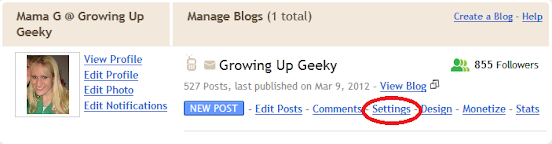
1. In your Blogger Dashboard, click on Settings.


2. Underneath the Settings tab, click on Comments.


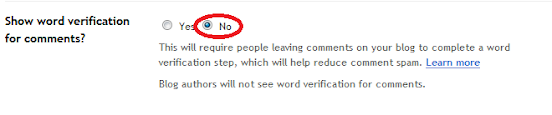
3. Scroll down to "Show word verification for comments?" (third from bottom) and select the "No" option. Save. Done.


How to turn off CAPTCHA in New Blogger:


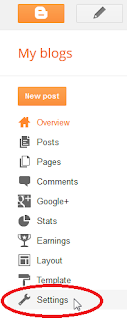
1. In your Blogger Dashboard, click on Settings.

2. Nested under Settings, click on Posts and comments.

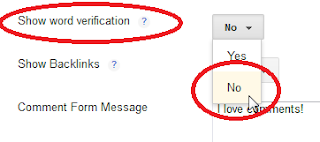
3. Scroll down to "Show word verification" (in the Comments section) and select "No". Save. Done. 


The blogging world thanks you :)

Photobucket

Saturday, October 22, 2011

Blogging Tips - How to Resize and Align Buttons

I've gotten a lot of blogging and HTML questions lately. While I am not an HTML or design expert by any means, there are a few things that I have figured out! Instead of individually answering your questions I thought it might be more beneficial to post the answers here.

Question: How do you get the buttons on your blog roll page to line up so nicely?

I am anal a bit of a perfectionist and seeing buttons in different sizes and/or not lined up correctly makes me cringe {I know, pretty stupid, right?} I'm going to use the first line of my blog roll page as an example. I'm sure these bloggy friends of mine won't mind ;)

If I just copied and pasted all of their button codes without making any changes, here's what it would look like:
Image and video hosting by TinyPic
Tales of the Mouse

Eeek! This would drive me crazy. And it just doesn't look very nice and polished, does it? There really doesn't seem to be a standard blog button size on the interwebz, so you might see some buttons that are 125x125 (like mine), 150x150, 200x200, or other random dimensions. Also, some people include alignment or line breaks in their code which can throw things off.


So I tweaked the code just a little bit and here's how it looks now:
Tales of the Mouse

Much better! Here's how I did it:

1. I removed any line breaks "<br>" and alignment code "<center></center>"
    2. I added one tap of the space bar in between each button
      3. I came across a number of different ways to resize the buttons, but found this to be the easiest:
      Before: <img src="http://i53.tinypic.com/2i9gq6f.jpg" />
      After:    <img height="125" src="http://i53.tinypic.com/2i9gq6f.jpg" width="125" />
        Just add height="size you want" after "img" and then width="size you want" after the URL of the button.

        If you'd like to line them up vertically in your sidebar, resize the buttons as you see fit but don't remove the line breaks. If they aren't included in the button code, you might want to insert them after each button.

        Please let me know if you have trouble with any of this, or if I left something out!

        Photobucket

        Related Posts Plugin for WordPress, Blogger...